
Download Resumonk – AI‑Powered Resume Builder & Cover Letter Tool
Overview
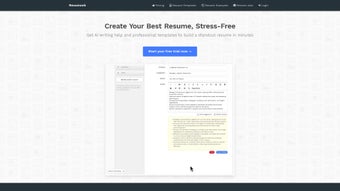
Resumonk is a cloud‑based resume and cover‑letter creation platform that leverages artificial intelligence to turn a basic CV into a polished, job‑winning document. The moment you land on the website, you’re greeted with a clean, distraction‑free interface that invites you to either import your LinkedIn profile, upload an existing PDF or DOCX resume, or start from scratch using one of more than 20 professionally designed templates. The AI engine works behind the scenes, analysing your experience, skills, and the job description you provide, then suggesting rewrites, stronger action verbs, and keyword optimisation that align with applicant‑tracking systems (ATS).
In addition to the core resume builder, Resumonk offers a dedicated cover‑letter editor that automatically matches the visual style of your chosen resume template, ensuring a cohesive application package. All documents can be downloaded in high‑resolution PDF or editable DOCX formats, or hosted online with a custom URL that lets you track views and shares—perfect for modern job seekers who want to monitor the impact of their applications. Whether you’re a fresh graduate, a seasoned professional, or someone looking to make a career pivot, Resumonk’s blend of simplicity, AI assistance, and design flexibility makes it a compelling choice for anyone who wants to create a standout resume without spending hours on formatting.
Key Features That Set Resumonk Apart
- AI‑Powered Rewrite & Suggestions: One‑click “Rewrite with AI” transforms bland bullet points into compelling statements, while “Get AI Suggestions” recommends industry‑specific keywords and phrasing.
- LinkedIn Import: Seamlessly pull your profile data into the builder, saving you time on manual entry and ensuring consistency across platforms.
- 20+ Designer Templates: Choose from reverse‑chronological, functional, hybrid, and creative layouts that are fully responsive and ATS‑friendly.
- Cover Letter Builder: Create a matching cover letter in minutes; the tool auto‑populates your contact info and adapts the visual style to the resume.
- Version Management: Store multiple resume versions, label them for specific roles, and switch between them without re‑editing.
- Online Hosting & Analytics: Generate a unique URL for each resume, share it with recruiters, and view real‑time statistics on visits and downloads.
- Export Options: Download in high‑resolution PDF for printing or in editable DOCX for further customisation.
- Secure Cloud Storage: All documents are encrypted in transit and at rest, giving you peace of mind about data privacy.
- Multi‑Device Access: Use the web app on Windows, macOS, Linux, Android, or iOS browsers – no additional software installation required.
- Free Tier & Affordable Upgrades: The basic plan is free for unlimited resumes; premium features like advanced analytics and custom domains are available via a low‑cost subscription.
Installation & Usage – Getting Started in Minutes
Because Resumonk is a web‑based SaaS solution, there’s no traditional installation process. All you need is a modern browser (Chrome, Firefox, Edge, or Safari) and an internet connection. Here’s a step‑by‑step guide to create your first AI‑enhanced resume:
- Create an Account: Visit Resumonk.com and sign up using an email address or a Google/LinkedIn OAuth. The registration is free and takes under a minute.
- Choose a Starting Point: On the dashboard, click “Create New Resume.” You’ll see three options – Import LinkedIn, Upload Existing Resume, or Start from Scratch.
- Import or Upload: If you select LinkedIn, you’ll be redirected to authorize Resumonk to read your profile. For uploads, drag‑and‑drop a PDF or DOCX file; the system parses the content and populates editable fields.
- Select a Template: Browse the template gallery and preview each design. Click “Use This Template” to apply it to your data.
- Activate AI Assistance: With your draft visible, hit the “Rewrite with AI” button next to any section (Summary, Experience, Skills). In seconds, the AI provides a refined version. Use the “Get AI Suggestions” panel to add missing keywords tailored to a specific job posting.
- Customize Layout & Design: Adjust fonts, colors, and spacing via the side panel. The drag‑and‑drop interface lets you reorder sections effortlessly.
- Create a Cover Letter: Switch to the “Cover Letter” tab, choose a matching template, and let the AI generate a personalized introduction based on the job description you paste.
- Save & Export: Click “Save” to store the document in the cloud. Then select “Download PDF” for a printable version or “Download DOCX” if you need a Word file for further tweaks.
- Share & Track: Enable “Online Hosting” to receive a unique URL. Share this link on LinkedIn or in an email signature. The analytics dashboard shows view counts, device types, and geographic data.
Even users with limited technical skills can complete these steps in under ten minutes. The platform’s intuitive design reduces the learning curve dramatically, allowing job seekers to focus on content quality rather than formatting hassles.
Compatibility, Pros & Cons – What to Expect Across Devices
Supported Platforms: Because Resumonk runs entirely in the browser, it is compatible with Windows 10/11, macOS Catalina and later, major Linux distributions, as well as mobile browsers on Android 8+ and iOS 13+. The responsive UI adapts to tablets and smartphones, making it easy to edit your resume on the go.
Pros
- AI assistance dramatically improves language quality and keyword relevance.
- No installation required; works on any modern browser.
- Free tier offers unlimited resumes – great for frequent job hunters.
- Professional template library eliminates design guesswork.
- Online hosting with analytics provides unique insight into recruiter interest.
- Secure cloud storage protects personal data.
- Integrated cover‑letter builder ensures a consistent application package.
Cons
- Advanced AI features (e.g., bulk keyword optimization) are locked behind the premium plan.
- Limited offline functionality – you need an internet connection to edit.
- Custom domain hosting requires a higher‑tier subscription.
- Some niche template styles (creative portfolios) are not available.
Frequently Asked Questions
Is Resumonk really free to use?
Yes, Resumonk offers a completely free tier that lets you create, edit, and download an unlimited number of resumes and cover letters. Premium features such as advanced analytics, custom domains, and bulk AI optimizations require a paid subscription.
Can I import my LinkedIn profile directly?
Absolutely. By clicking the “Import LinkedIn” button, you authorize Resumonk to pull your work experience, education, and skills. The data is then mapped to editable fields, saving you hours of manual entry.
How secure is my personal information?
Resumonk uses HTTPS encryption for all data transfers and stores documents in encrypted cloud storage. The company complies with GDPR and CCPA standards, ensuring your personal data remains private.
Can I export my resume in Word format for further editing?
Yes, after finalising your resume you can download it as a DOCX file, which is fully compatible with Microsoft Word, Google Docs, and other word processors.
Does the AI rewrite feature guarantee a perfect resume?
The AI provides strong suggestions and improves wording, but it’s still advisable to review the output for personal tone and accuracy. Think of it as a powerful assistant rather than a complete replacement for human proofreading.
Conclusion – Should You Download Resumonk?
Resumonk delivers a compelling blend of AI‑driven content enhancement, a rich library of modern templates, and a seamless online workflow that works on virtually any device. For job seekers who value speed, professional design, and data‑driven insights, the platform stands out as a premium yet affordable solution. The free tier is generous enough for most users, while the optional paid upgrades unlock deeper analytics and branding capabilities for power users. Though it lacks offline editing and some ultra‑niche design options, those limitations are minor compared with the time saved and the boost in resume quality that AI suggestions provide. If you’re ready to transform a basic CV into a polished, ATS‑friendly masterpiece without learning complex design software, download Resumonk today and start building a resume that truly reflects your professional story.



.png)



